Having loved vibe coding different projects felt next natural step is to jump from vibe coding to AI agents. As per usual I took the long route by deep diving into theory. See course notes below but didn’t have a ai agent I used daily. Maybe a bit more technically confident but thats all.
AI Agents just hadn’t clicked for me. You know when you feel like you are missing something.
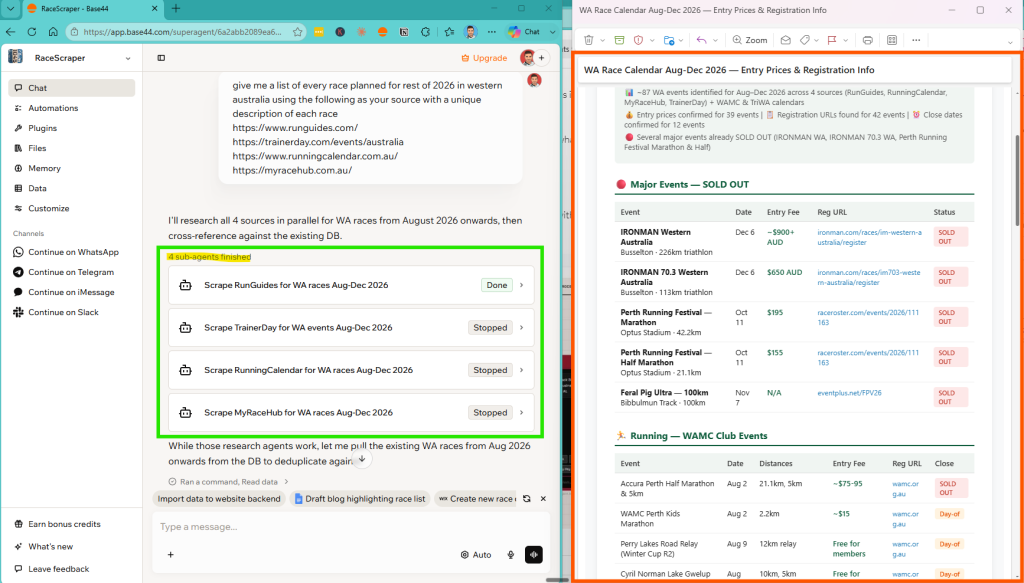
I had done a lot of vibe coding websites but agents were harder requiring more setup that is until I started using Base44. This agent below i’m using to build my database for my NegativeSplits.ai app that came from triathlon pace calculator.
You can see below just some simple instructions it spinned up 4 agents, worked in background, sent me a email report that was perfectly formatted as a result and even migrated the data into my other apps database.
Base44 have a free plan and if you can use my link here I will get a referral commission. Its my favourite AI tool at the moment.
Specpress was my first experiment with Base44 which you can read below. Took a lot more instructions compared to Race Scraper.
SpecPress is connected to google, notion, whatsapp, google search console, google analytics, gmail and this website. I started by building out the following workflow:
- Create a content calendar in notion
- Each week SpecPress takes article title
- Does keyword research and article outline
- Messages on WhatsApp asking question
- Answer via voice note till complete
- Writes draft and does AI check
- Creates a custom feature image with Nano Banna
- This article was created by SpecPress 10km swim training plan by ChatGPT Review
In 5 prompts it vibe coded a working solution that connected to notion to take a spec, asked questions in WhatsApp, took my voice notes as inputs, created a draft, did a ai check and then created a draft in WordPress – all while out walking.
After connecting the various sources I realized the true ability of being able to query and figure out what is possible vs setting fixed workflows and just having skills or tools to call on.
That is until I built my first super agent I called SpecPress.
Learning Theory of Agentic Engineering
I’d been nodding along in meetings about “agentic workflows” and “tool calling,” mentally filing these concepts under “things developers handle.” My job was strategy and delivery, not code. Let them handle the implementation details.
So I did something I haven’t done since college, back when I was still writing code in computer science classes: I learned to program again.
Not because I wanted to become an engineer, but because I needed to be a better product person. What followed was a three-month journey from intimidation at the sight of a terminal window to confidently building, optimizing, and deploying AI agents.
What You’ll Learn From This Journey
In this post, I’ll show you exactly how I went from product manager to building production AI agents—including:
- The mental shifts that made technical concepts finally click
- Specific resources that work for non-developers (with honest assessments)
- Prompting mastery before and after is like night and day
- System Prompts are Architecture AND logic; code = orchestration and infrastructure
Whether you’re a PM, strategist, or business professional who’s tired of nodding along in technical discussions, this is your roadmap.
Like most it started on chat-gtp querying and chatting back and fort to create content, and even built my own GPT which parsed documents.
It was when I started “vibe coding” on Lovable thanks to The Startup Ideas Podcast the penny dropped how powerful and impactful AI will be going forward and I needed get ahead of it.
To improve vibe coding I did a Master Data Modelling Fundamentals but I caught the learning bug so also quickly after did the AWS AI Practitioner certification as there was also a course on Udemy.
I got a nice overview of AI and in particular AWS AI service but still didn’t feel like I really knew how it worked in the background.
Then I found Ed Donner’s “Complete Agentic AI Engineering Course” and everything clicked.
Thanks to Ed I went from intimidated by IDEs to building a fully functional AI chatbot that represents my professional background—complete with evaluators, tools, and deployment.
Vibe coding has taken a back seat the past few months as I deep dived into the world of Agentic Engineering. I felt that I really needed to see behind the curtain and how the SDKs actually worked to understand the technology.
Agentic AI Engineering Course Overview
After getting certified I stumbled upon LLMs for Leader which then lead me The Complete Agentic AI Engineering Course as I found the instructor Ed Donner a plain English elegant instructor that was easy to listen to.
The course had 6 modules starting with foundations and then using OpenAI and the Agent SDK, CrewAI, LangGraph, AutoGen and MCP with 8 projects that were accessible via github. The projects were real world examples and easy to follow along.
The projects were used to demonstrate the various AI Agentic workflows such as build a Shane RAG chatbot and evaluating responses. The examples go through routing, parallel, and orchestrator based workflows (explained below).
Eds projects are based around teaching Agentic AI Frameworks from no framework such as OpenAI where you interact directly with models to give a foundation understanding of what to clever frameworks like LangGraph are doing behind the scenes such as plucking out JSON from responses and turning them into function calls.
💡 #1: LLMs Are Just Text Predictors
Before I get into detail if you takeaway one thing for me it was when Ed explained “An LLM is just something that’s generating the most likely next tokens”
Why It Clicked: I’d been thinking of AI as this mystical intelligence. Realizing it’s essentially sophisticated autocomplete made everything less intimidating. It’s predicting text based on patterns.
How This Changed My Approach:
- Stopped expecting AI to “understand” intent magically
- Started providing more explicit context and structure
- Understood why prompt engineering matters so much
Practical Impact: When my chatbot gave weird responses, instead of thinking “the AI is broken,” I asked “what patterns in my prompt led to this output?” This debugging mindset shift was game-changing.
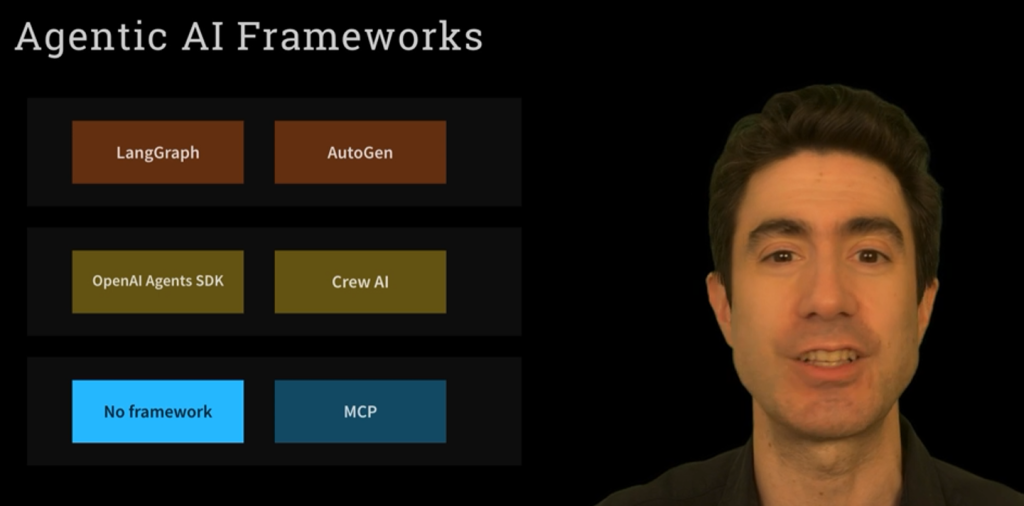
I found this video on YouTube which was probably a precursor to Eds course and will give you a good feel of his style and course material.
Module 1: Foundations
The start of the course is beginner friendly helping setting up the Cursor: The best way to code with AI using Windows or Mac & UV Pack Manager. All stuff that went over my head so appreciated the step by step instructions on how set everything up.

Building Effective AI Agents \ Anthropic covers majority of what week 1 day 1 and 2 covers. Copy pasted the following which also Ed referenced….
“Agent” can be defined in several ways. Some customers define agents as fully autonomous systems that operate independently over extended periods, using various tools to accomplish complex tasks.
Others use the term to describe more prescriptive implementations that follow predefined workflows. At Anthropic, we categorize all these variations as agentic systems, but draw an important architectural distinction between workflows and agents:
- Workflows are systems where LLMs and tools are orchestrated through predefined code paths
- Agents are dynamic systems where LLMs direct their own processes and tool usage, maintaining control over how they accomplish tasks.
The article goes through the common patterns for agentic systems they’ve seen in production.

When implementing agents, Anthropic three core principles:
- Maintain simplicity in your agent’s design.
- Prioritize transparency by explicitly showing the agent’s planning steps.
- Carefully craft your agent-computer interface (ACI) through thorough tool documentation and testing.
Eds top 3 tips when building agents were
- Favour workflow over autonomy initially
- Work bottom up – not top down (1 simple agent)
- Start simple – then add
Understanding importance of prompting
It was very clear quickly the importance of system prompt vs user prompt and that they should be both passed into the API when making a call. If this course taught me one thing is the importance of the system prompt.
Using system prompts brings the real power to the tool and now I understand what people mean when Ed said say that most problems are solved with prompts.
- System Prompt: The overarching instructions, context, expected format and way should be responded to
- User Prompt: The actual question coming from the user.
Eds two key tips were
- Think context rather than memory (what goes into prompt)
- Most problems are solved with prompts
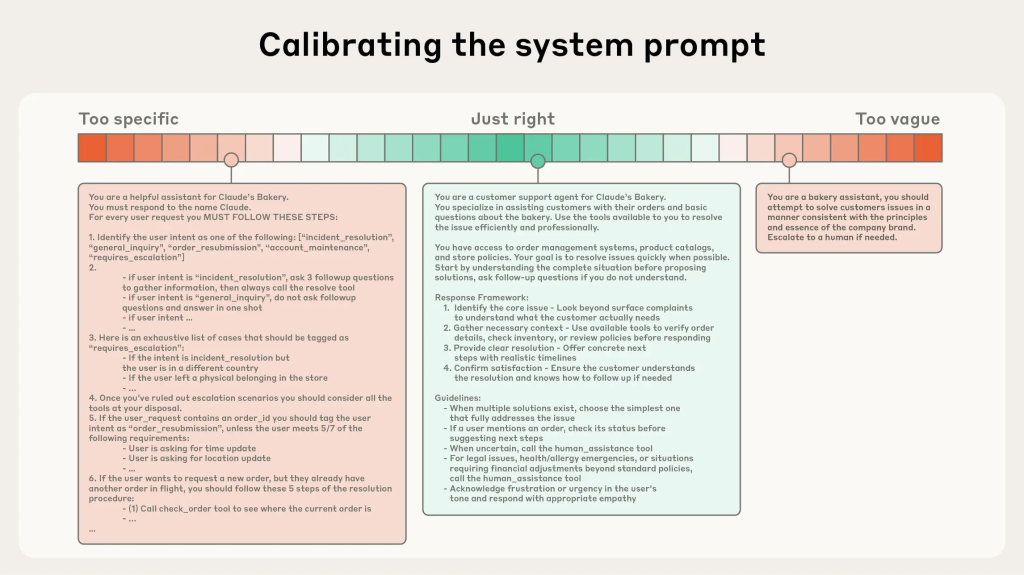
A resilient prompt is one that provides high-quality responses across the full breadth of possible inputs.
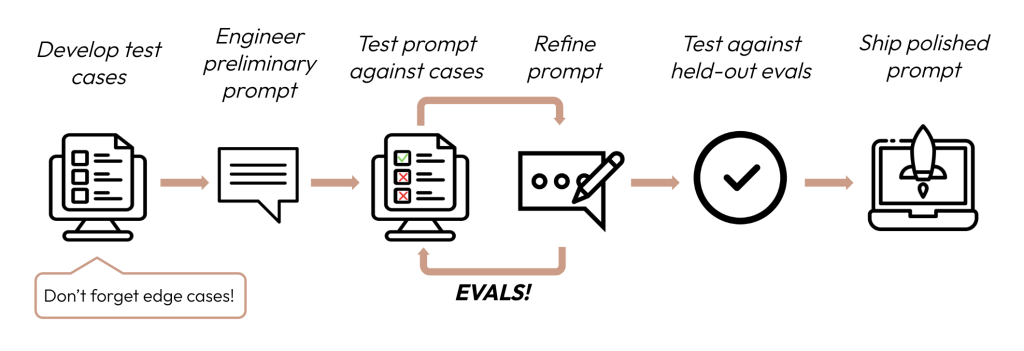
Prompt should be extremely clear and use simple, direct language that presents ideas at the right altitude for the agent. The right altitude is the Goldilocks zone between two common failure modes of too specific and too vague.
They recommend organizing prompts into distinct sections like <background_information>, <instructions>, ## Tool guidance, ## Output description, etc) and using techniques like XML tagging or Markdown headers to delineate these sections, although the exact formatting of prompts is likely becoming less important as models become more capable.
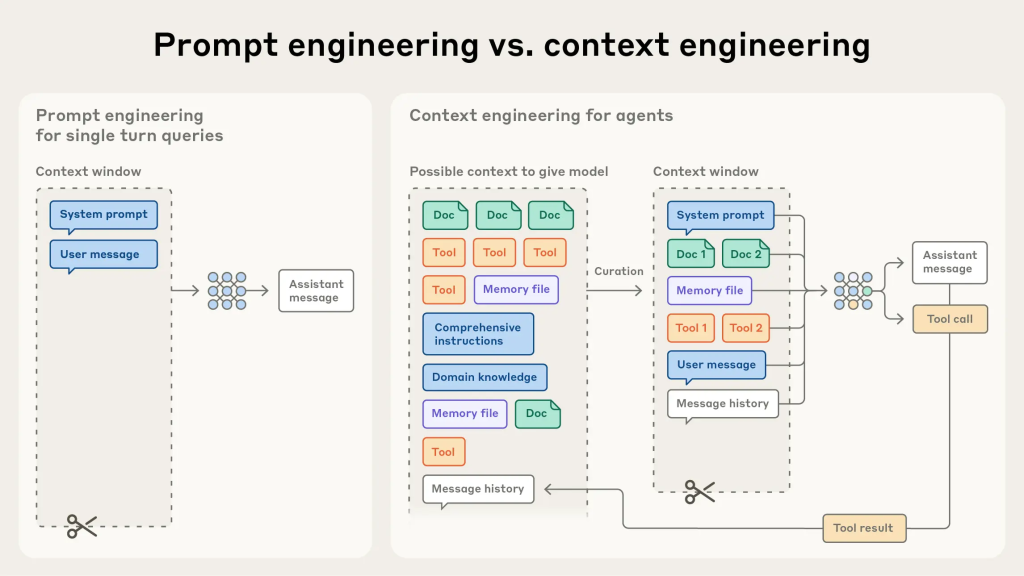
As the course continued we were passing arrays of tools and context via the API calls which helped me understand further about context windows and the importance of context engineering.
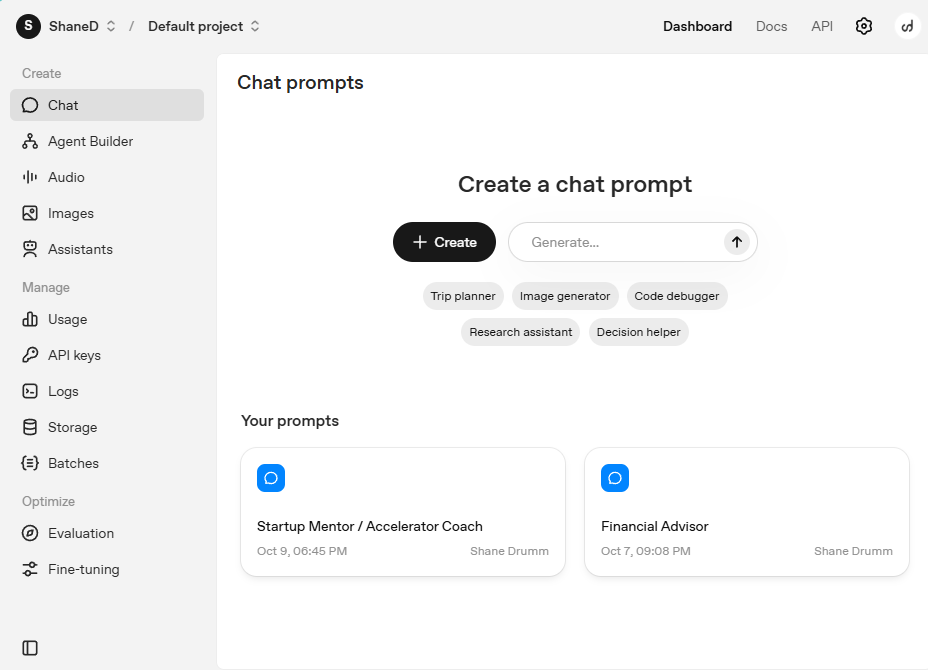
I now use prompt generators as starting points such as Anthropic and OpenAIs. For OpenAI in particular I found it a lot more useful than the more ChatGPT interface as I can version, optimize, use variables which what I did from my personal financial advisor to track net worth while also making plans for migrating back to Ireland.
Before/After: My Prompt Evolution
Week 1 Prompt (Terrible)
messages = [
    {"role": "user", "content": "Tell me about Shane's experience"}
]
Problems:
- No context about who Shane is
- No output format specified
- No guidelines on what to include/exclude
- Token-inefficient (AI has to guess everything)
Week 12 Prompt (Optimized)
system_prompt = """
You are a professional career assistant representing Shane Drumm.
<background>
Shane is an Agile Delivery Manager with 15 years experience in product management.
Key achievements: [specific list]
Current focus: AI agents and agentic workflows
</background>
<instructions>
- Provide concise, relevant responses (max 3 paragraphs)
- Focus on professional experience and technical skills
- If asked about personal topics, politely redirect to professional context
- Always cite specific projects when possible
</instructions>
<output_format>
Use markdown formatting. Include relevant links when available.
</output_format>
"""
messages = [
    {"role": "system", "content": system_prompt},
    {"role": "user", "content": user_question}
]
Improvements:
- ✅ Clear context and boundaries
- ✅ Specific output requirements
- ✅ Structured with XML tags
- ✅ Reduced hallucinations by 80%
- ✅ Cut token usage from 10,000 to 600
Learning python via CHatGpt
Ed used a really smart way of creating simple but relevant guides using ChatGPT. Included couple examples like the guide to build your confidence working at the command line. or Git and Github for a PC or Mac audience: https://chatgpt.com/share/68061486-08b8-8012-97bc-3264ad5ebcd4
A complete Python Fundamentals course
- Python imports: https://chatgpt.com/share/672f9f31-8114-8012-be09-29ef0d0140fb
- Python functions including default arguments: https://chatgpt.com/share/672f9f99-7060-8012-bfec-46d4cf77d672
- Python strings, including slicing, split/join, replace and literals: https://chatgpt.com/share/672fb526-0aa0-8012-9e00-ad1687c04518
- Python f-strings including number and date formatting: https://chatgpt.com/share/672fa125-0de0-8012-8e35-27918cbb481c
- Python lists, dicts and sets, including the
get()method: https://chatgpt.com/share/672fa225-3f04-8012-91af-f9c95287da8d - Python files including modes, encoding, context managers, Path, glob.glob: https://chatgpt.com/share/673b53b2-6d5c-8012-a344-221056c2f960
- Python classes: https://chatgpt.com/share/672fa07a-1014-8012-b2ea-6dc679552715
- Pickling Python objects and converting to JSON: https://chatgpt.com/share/673b553e-9d0c-8012-9919-f3bb5aa23e31
Why learn python?
Ed uses the openai python client library a lightweight python utility that turns your python requests into an HTTP call and converts the results coming back from the HTTP call into python objects
When you make the python call: openai.chat.completions.create()
It simply makes a web request to this url: https://api.openai.com/v1/chat/completions
And it converts the response to python objects.
It’s not got any code to actually run a Large Language Model! No GPT code! It just makes a web request
There’s no scientific computing code, and nothing particularly specialized for OpenAI.
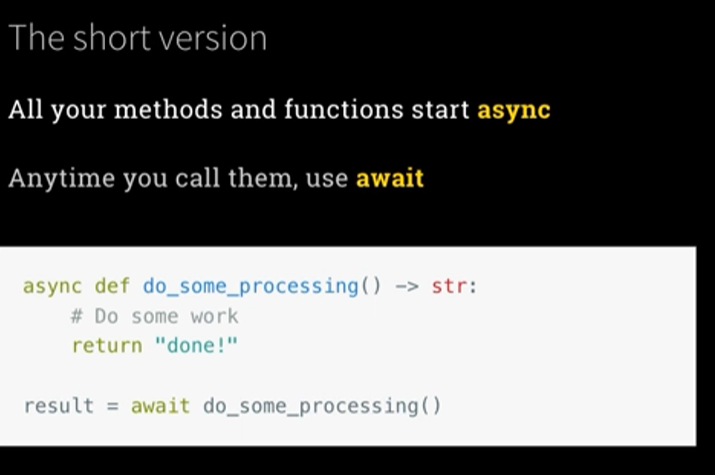
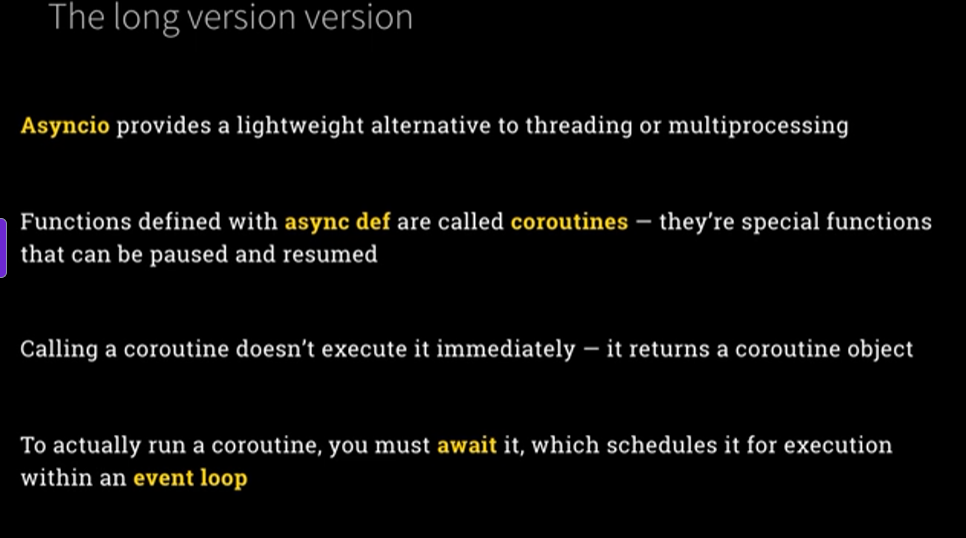
Another cool feature of python is asyncio is a Python library that allows you to write concurrent code using the async/await syntax. It provides a framework for running asynchronous operations, without relying on multithreading or multiprocessing. The heart of asyncio is the event loop, which schedules and executes asynchronous tasks (called coroutines) in the background.
Using Cursor & Powershell
When I started vibe coding a few months ago I stuck to tools like Lovable as found IDEs like Cursor too much for what I needed and to be honest a bit intimidating.
I’m not a developer so no need for full control over code and knowing how to structure files etc.
Even using Replit – Build apps and sites with AI for 📴Whisper AI – Design sprint a small bit of guesswork on my part on how to use it effectively.
One of the biggest takeaways for me was becoming comfortable with Cursor: The best way to code with AI and notebooks.
Ed had easy to follow videos to install and get setup cloning the repo of the course using powershell at the very start. The steps are made for beginners.
Yes you have use the terminal but it was a lot easer when you are following along with purpose and Ed helps set everything up it made it very easy to follow along.
First, here’s a briefing on how this fits together, and how to create and run a notebook in Cursor: https://chatgpt.com/share/6806291a-25f0-8012-a08b-057acb5045ae
In module 6 it gets advanced as you start using WSL-remote to utlize a linux virtual machine to use MCP as there is a Windows error. Wouldn’t been able to do this without Eds guidance.
Evaluator Optimizer AI AGent WOrkflow – shane chatbot
Project 1: Career Digital Twin. Build and deploy your own Agent to represent you to potential future employers.
Eds example is where you build the chatbot that generates a pdf of my LinkedIn and takes a summary text files as inputs.
Using OpenAI the Messages API we got started with basic messages = [{“role”: “user”, “content”: question] then asked an agent to create a question and passed the answer to another agent to answer it.
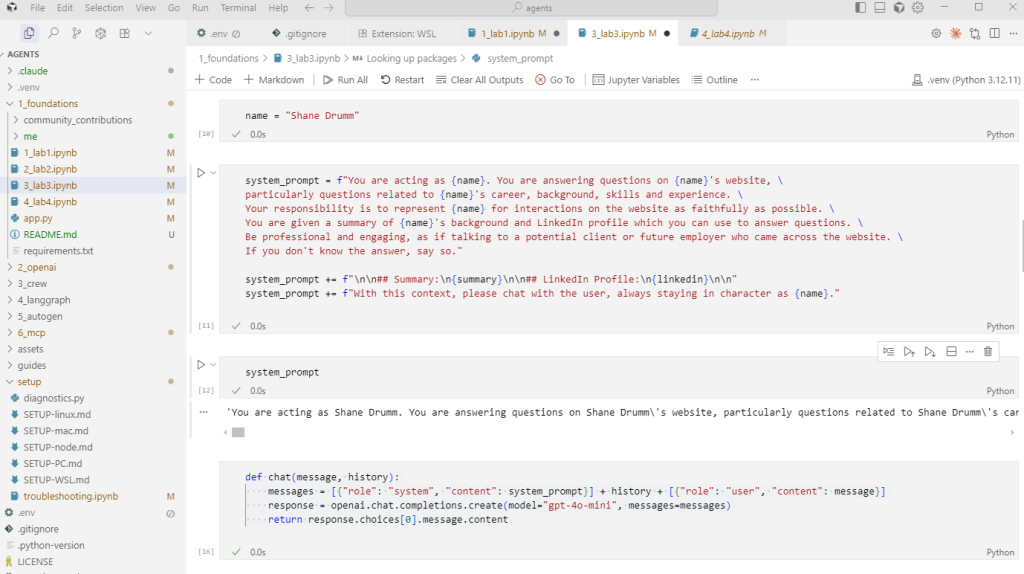
It becomes an Evaluator Optimizer agentic workflow when we use Gemini to evaluate the structured output response from OpenAI and rerun if the answer fails evaluation. Then finally out it all in one workflow.
We used Gradio as the messaging interface. Gradio is the fastest way to demo your machine learning model with a friendly web interface so that anyone can use it, anywhere!
Next module Ed used Pushover to send notifications on your phone when somebody ask a question the LMM can’t answer or if they are engaged ask for an email address.
To do this he created tools. The tools are then passed to the LMM which simply chooses to use the appropriate tool available to them. All using old fashioned while and if / else statements for the magic to happen.
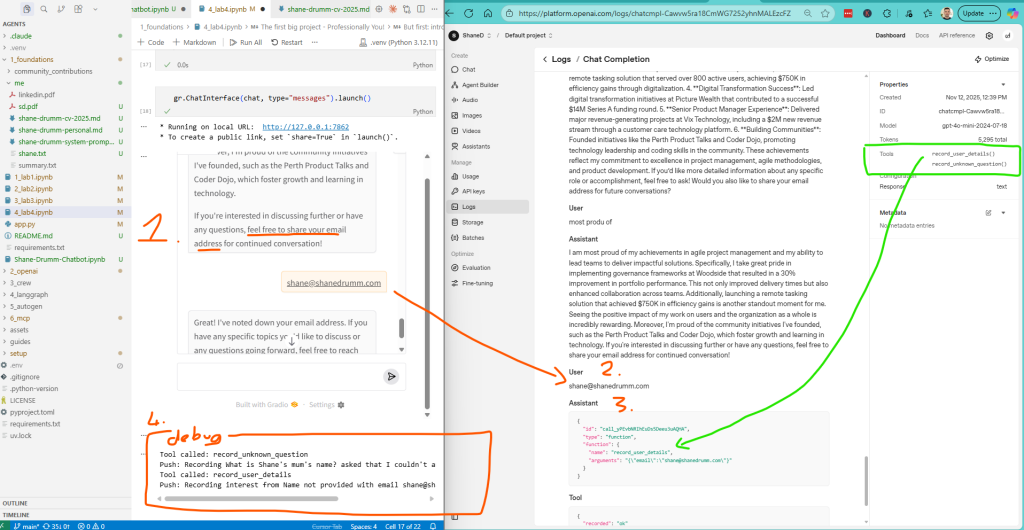
Next we published chatbot using Gradio and Hugging Face.
I revisited this project after completing the course with my product hat to refine it 🤖Building Shane Chatbot: From 10,000 Tokens to 600 – Shane Drumm which focused on optimizing tokens and the user experience.
Module 2: OpenAI Agents sdk
Super lightweight and flexible framework. This Eds favourite.
In Module one we use messages api but in module two we are using the Agents SDK
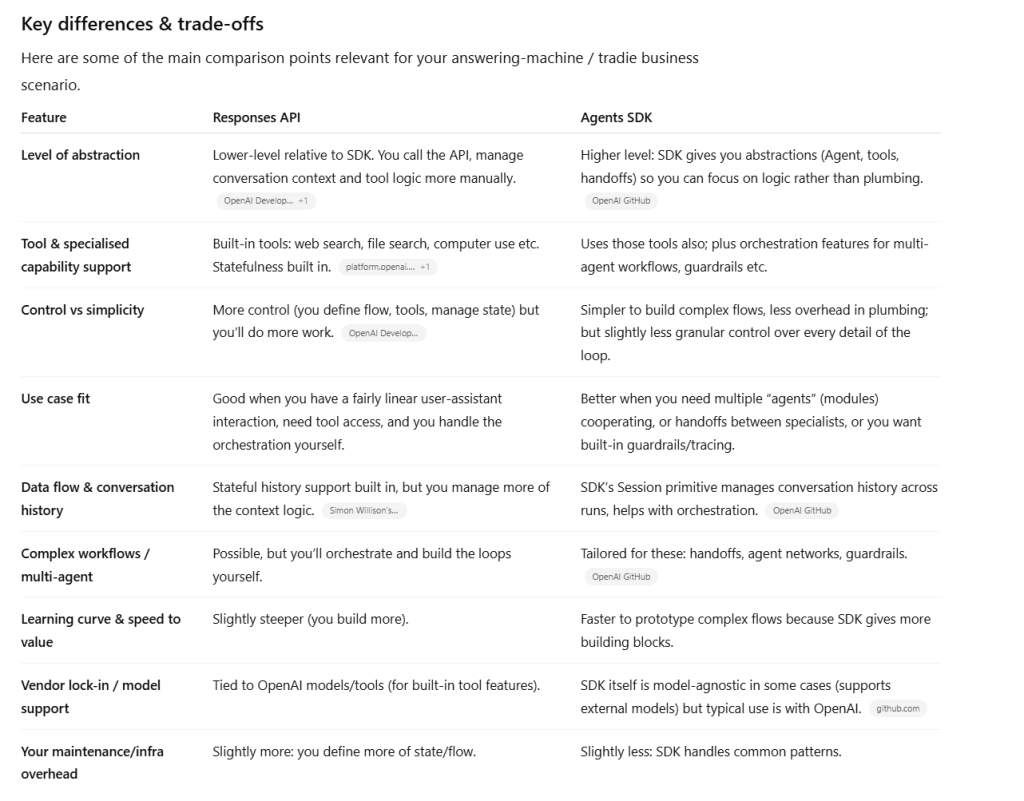

Key concepts
- Agents represent LLMS
- Handoffs are interactions
- Guardrails represent goals
Process
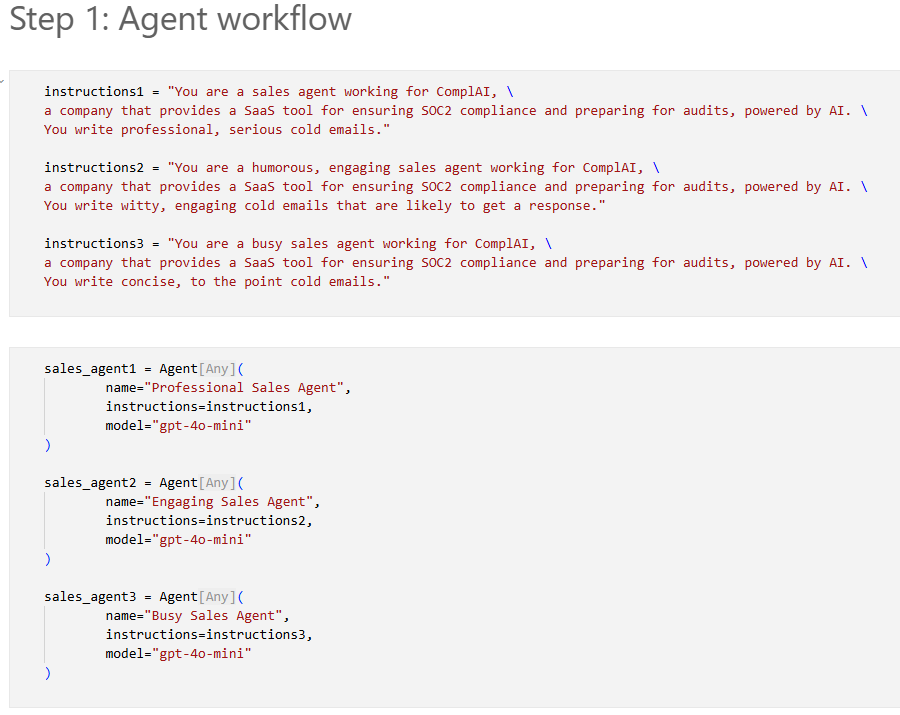
- Create an instance of Agent
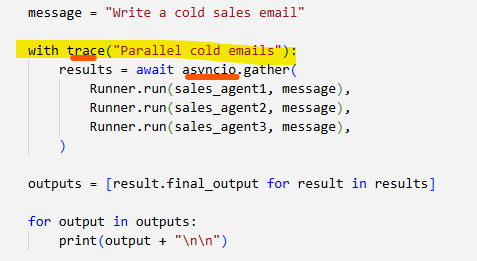
- Use with trace() to track teh agent
- Call runner.run() to run the agent
Each agent = 1 system prompt.
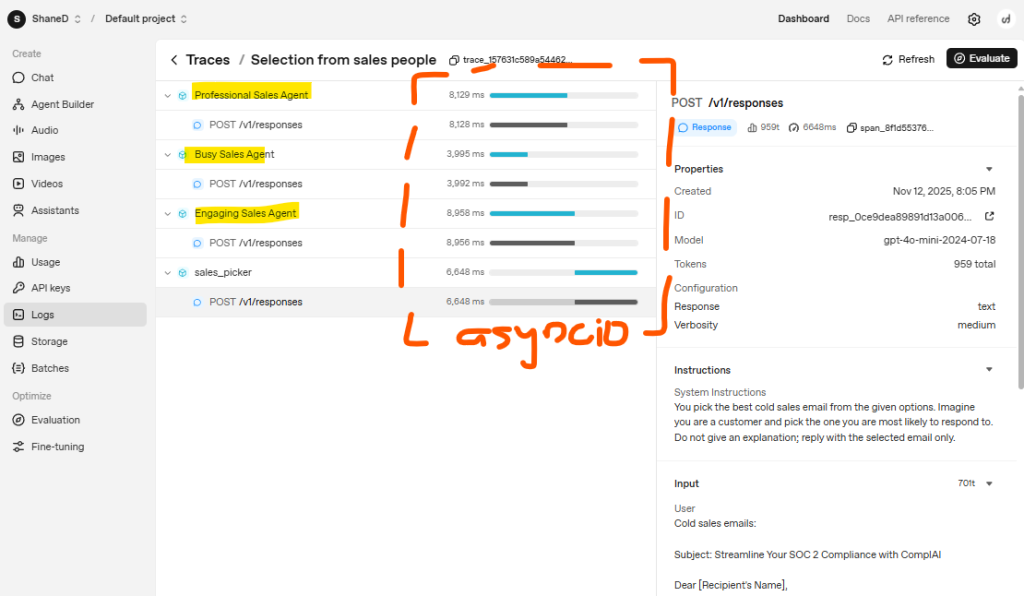
The project has 3 agents and main learning was using the agents sdk and showing asyncio in work by having the 3 agents working in parallel.
When using trace you can look at the trace https://platform.openai.com/traces
Next we go through Tools which are then used by the LLM. A simple tool like sending email via Sendgrid API as we do in the project. All you do is use @Tool decorator to wrap the coroutine.
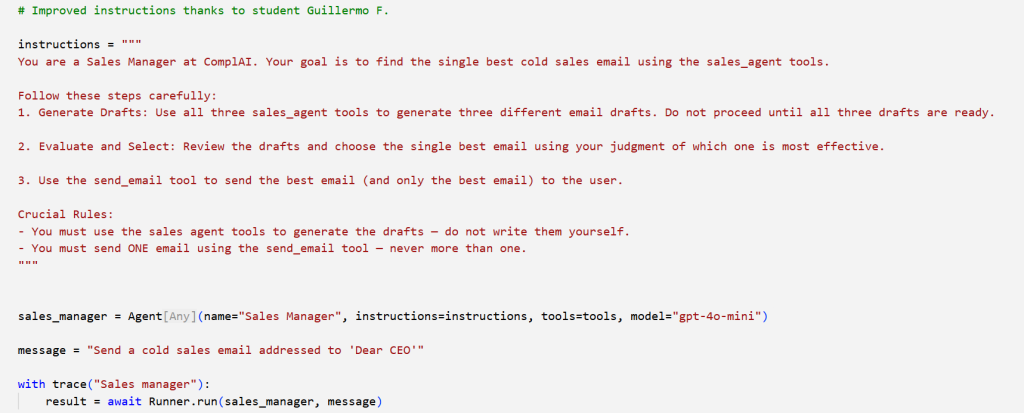
Even cooler you can turn agents into Tools. What a tool actually means it contains all the JSON and describes what that tool can do. So what we did was create a new agent with a system prompt with chain prompting instructing it to use the tools (sales agents) evaluate responses and then use the other tool to send email.
in just a handful lines of code it does all this and you can look at the trace to see it working through the prompt.
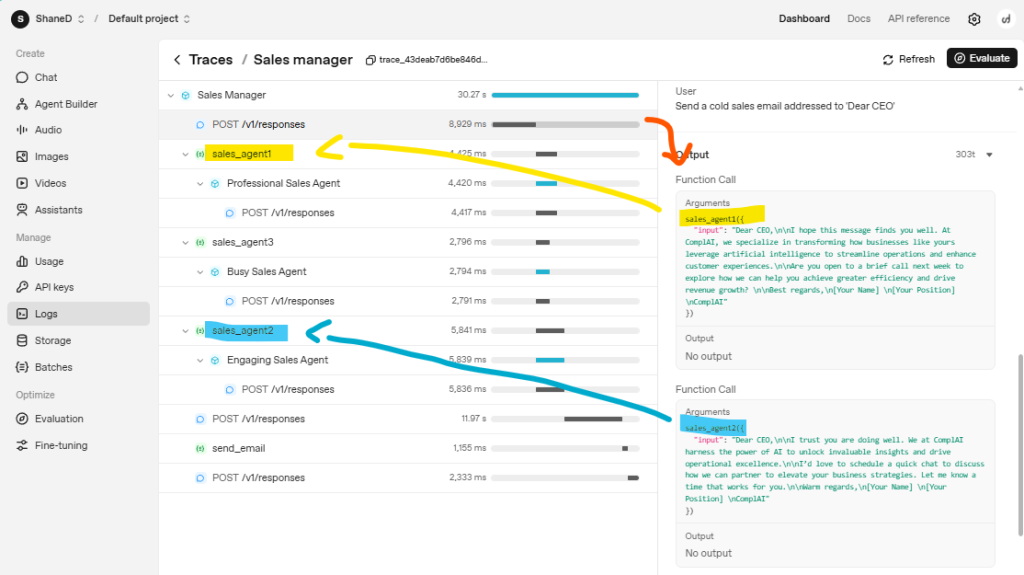
Next it got a bit more complicated but same concept of using tools. Ed created another agent called Email Manager who also has 3 tools but their tools are subject_writer, html_converter, send_html_email.
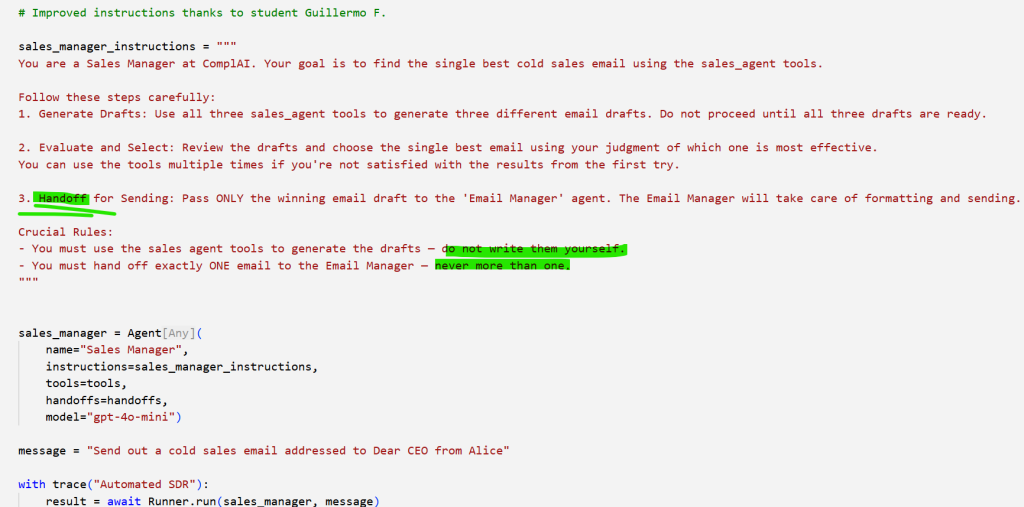
Handoffs and Agents-as-tools are similar: In both cases, an Agent can collaborate with another Agent
- With tools, control passes back
- With handoffs, control passes across
Seems complex but actually simple. This for me was when I started to realize the importance / POWER of system prompts.
The biggest difference from earlier prompt is defining when to handoff in step 3 and updating the crucial rules.
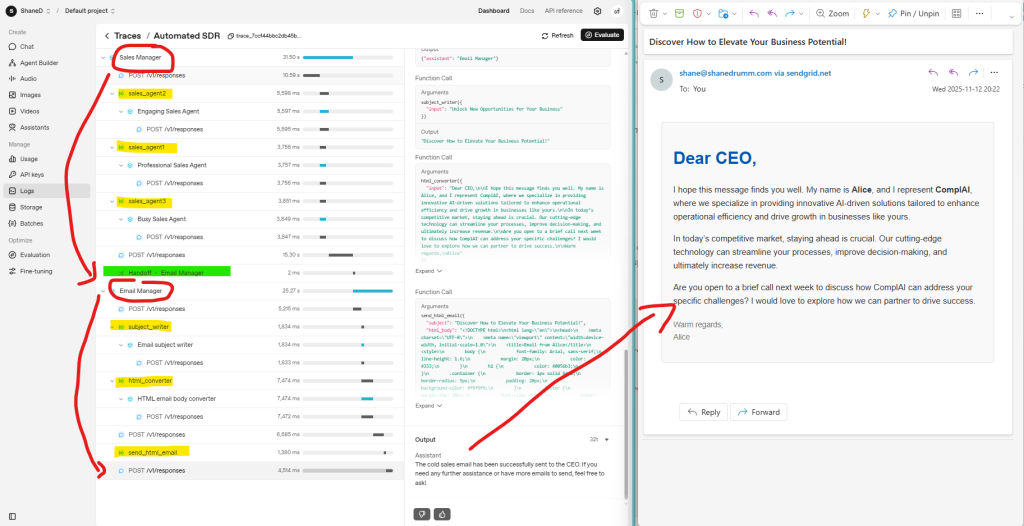
and this is the final result from the trace and resulting in me receiving the email from Alice
In conclusion you can see from the logs where it clearly states the handoffs and tools:
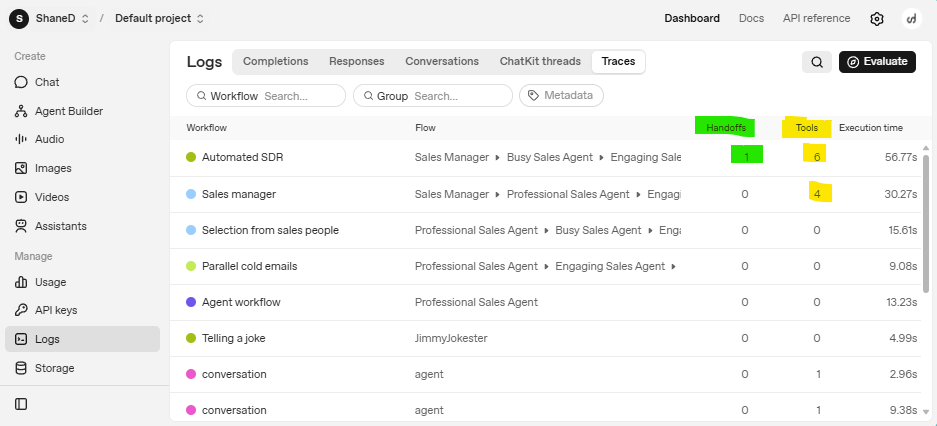
This handoffs between agents is the actually giving the agents autonomy.
Ed continues this working example but starts to use other models in Gemini, Groq and Deepseek.
The one last key lesson was using Guardrails.
Once again your are using agents as Guardrails which protect the input or the output. The big difference though is that instead of outputting text the guardrail outputs an object.
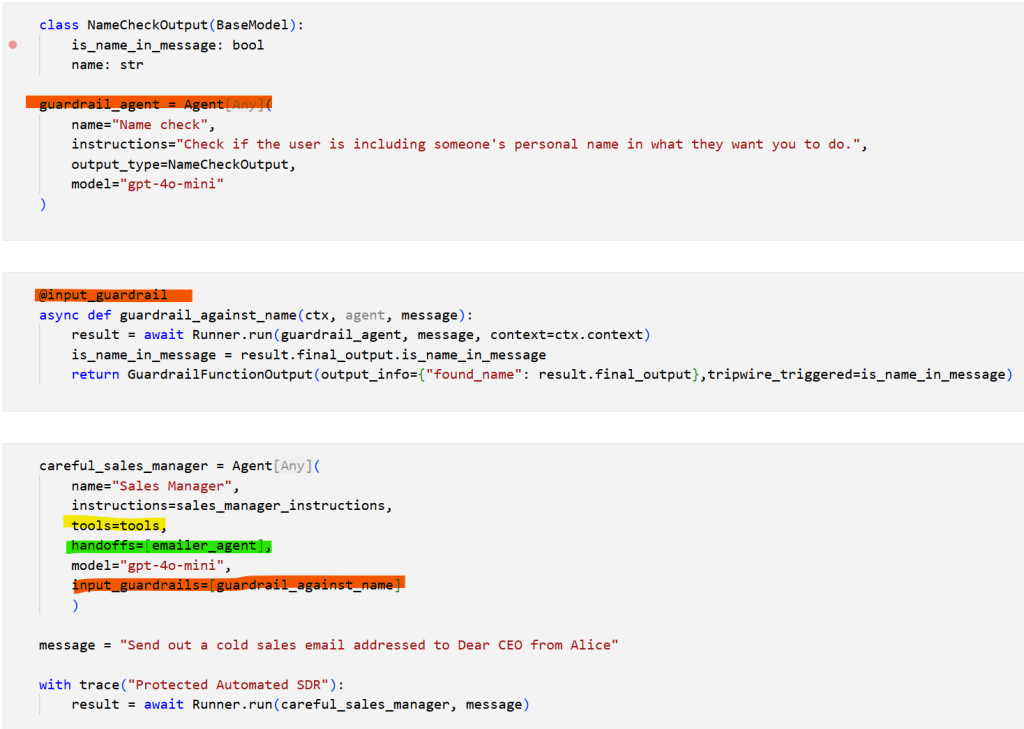
Ed continues with OpenAI and builds a Planner Agent and a Deep Research tool using multiple models and advanced user interface by yielding results with gradio again.
More on OpenAI Cookbook DIY
You could just follow the OpenAI Cookbook and complete this module and learn the same stuff but I personally enjoyed the talking head of Ed and his structured approach.
There is so many possible distractions in the cookbooks, with all the options and not knowing where to start. Having the steps laid out for me took any guesswork out from my side.
Module 6: MCP

Ed simple way of explaining MCP servers while building one and highlighting when not to build one for me cleared up a few misconceptions I originally had.
MCP servers are local on your device not hosted. There are some ready made to use server ones but the majority you use can be found on directory sites such as Awesome MCP Servers or MCP Servers.
You’d only make a MCP server if its functionality others will use. If its just useful for your application a tool might be better suited.
There is a bug in Windows stopping you from using MCP servers so Ed shows how to setup up linux on my windows machine to run MCP servers.
This was probably the biggest win of the module as when I ran into same issue using Claude Code I was able to use this workaround.
Conclusions
Three months ago, I couldn’t confidently explain the difference between a system prompt and a user prompt. Today, I’ve built the Shane Chatbot using OpenAI’s Agents SDK, optimized it from 10,000 tokens to 600, deployed it on HuggingFace, and actually understand what’s happening under the hood.
More importantly, I’m comfortable working in Cursor, writing Python functions, and debugging agent workflows—skills that felt completely out of reach before this course.
Ed Donner’s teaching style made the difference. By starting with the fundamentals (direct OpenAI API calls) before introducing frameworks, I learned what tools like LangGraph and CrewAI are actually doing behind the scenes. The hands-on projects weren’t toy examples—they were real applications I could immediately adapt for my own needs.
Would I recommend this course? Absolutely, especially if you’re a product manager, strategist, or business professional who wants to move beyond just using AI tools to actually building them. The course assumes zero development background, and Ed’s step-by-step approach removes all the guesswork.
My only gripe of the course is that its a pity that Anthropic wasn’t included.
Luckily though Anthropic has excellent educational material such as this repository currently contains five courses anthropics/courses: Anthropic’s educational courses so I was able to do my own self learning but recommend starting here
- Building Effective AI Agents \ Anthropic
- How we built our multi-agent research system \ Anthropic
- Building agents with the Claude Agent SDK \ Anthropic
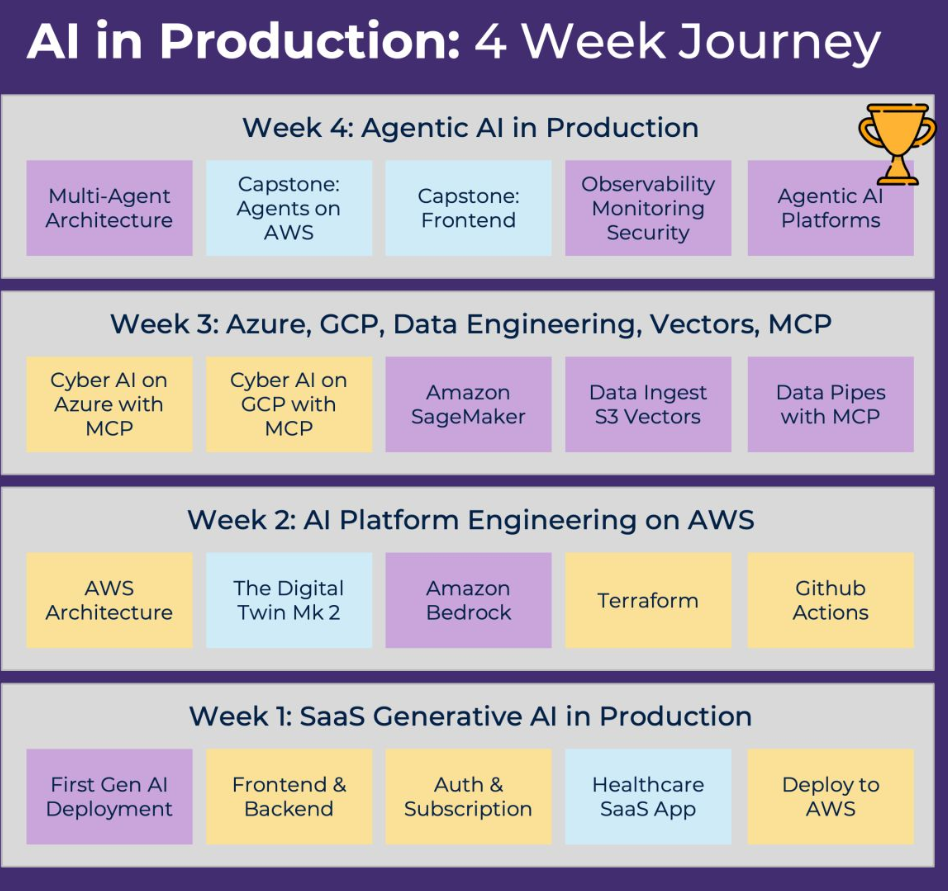
Ed has since released a follow-up course called AI in production as the agentic engineering is really more prototypes than actually safe real production ready systems which I might consider doing down the line.
AI in Production: Gen AI and Agentic AI at scale